About
This website is dedicated to the ancient Japanese board game of Taikyoku Shogi (大局将棋), a variant of shogi (often known as Japanese chess) played on a 36 × 36 board. Very little information about this game exists, and it was only discovered in 1997 when researchers were looking through the ancient family documents of the Ohashi family, a great Shogi and Go family. Only one primary source, Taikyoku Shogi Koma (大局将棋駒, Taikyoku Shogi Pieces) has been confirmed to exist, and was transcribed by Isao Umebayashi (梅林 勲) and Shin Okano (岡野 伸) and included in their book Sekai no Shogi (世界の将棋, Shogi of the World). Scans of relevant pages were uploaded to The Chess Variant Pages alongside with translations by L. Lynn Smith. These translations made it onto Wikipedia, from where the rules used on this website were derived.
An alternative set of translations were also published by George Hodges, the leading Shogi expert in the West, in his book Ten Shogi Variants, along with the additional mention of two other sources: another from the Ohashi family documents, and one from a museum in Kyoto. He claims that all three sources have differing piece names, and most likely conflicting piece movements. Apart from here, there are no other mentions to these other two sources. Hence, Sekai no Shogi is the only source we currently have available for information about the game.
The rules used on this website were derived from the English Wikipedia article, which we improved by looking through Sekai no Shogi and ensuring there were no errors from the copying process. However, there were instances where Sekai no Shogi did not explain something and hence varying interpretations have arisen. Importantly, the interpretations used on this website may differ from other sources such as English Wikipedia, Japanese Wikipedia or other Taikyoku Shogi software. Our interpretations and the decisions behind these are explained below.
Additionally, translating piece names into English has proven a difficult task. The English piece names used on this website have been derived from L. Lynn Smith's, and improved to be more consistent in how individual kanji (characters) are translated, making it easier for players to learn how to read the piece names from the Japanese. Furthermore, modern technology (Google Translate, LLMs) as well as the abundance of information online regarding niche topics which would not have been available when L. Lynn Smith or George Hodges published their translations, has been used and referenced in order to produce what we believe is the most accurate set of translations. Contentious translations and our decisions are also listed below.
Interpretation
Jumping pieces
Sekai no Shogi uses circles to represent a step to a square, and arrows to represent unlimited slides. Hence, putting a circle over an arrow would be redundant. However, the heavenly tetrarch king, great hawk, reclining dragon and great eagle have diagrams such as these:
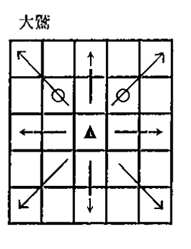
They are accompanied by a description saying they can run and jump over pieces in such directions. We have interpreted this as being able to jump over the piece marked by the ○ and then optionally continue sliding in that direction.
However, the treacherous fox and mountain crane present further complications. Their movement diagrams are shown below:
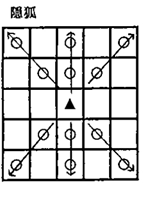
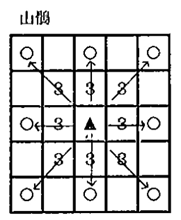
(Note that in the case of the mountain crane, the 3 ○ is an abbreviation for ○ ○ ○. This notation is explained clearly in the book.)
Unlike the four pieces with a single intersecting circle, both the treacherous fox and mountain crane lack any explanation. The interpretation on this website is that, in addition to sliding normally, they are able to jump over up to two and three pieces respectively in that direction, then optionally continue sliding.
Triple slashed arrow
Sekai no Shogi also uses an arrow with three slashes/bars through it to describe piece movements, such as with the ancient dragon:
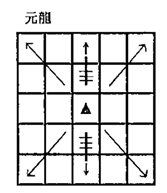
The authors note that with regards to this symbol, there is no explanation in the original text (i.e. Taikyoku Shogi Koma), but that it is thought they can jump over up to three pieces and slide. We have interpreted it as being able to slide whilst jumping over up to three pieces in the way.
This symbol can also be seen in the description of Maka Dai Dai Shogi, another large-board shogi variant, in Shogi Rokushu no Zushiki (象棋六種之圖式, Diagrams of Six Types of Shogi), a source written in classical Japanese oftentimes conflicting with other sources. Dr. Eric Silverman presented an argument on his blog that this symbol implies the piece can move as a combination of the lion dog and the free king. However, the lion dog in Maka Dai Dai Shogi as described in Shogi Rokushu no Zushiki moves differently to the lion dog in Taikyoku Shogi, having a special move which could either be translated as jumping or being able to perform the moves of a lion in that direction. Even though this is the only other usage of this symbol, due to the source's conflicts with other sources, the difficulty in interpreting it, as well as the fact that it isn't even about Taikyoku Shogi, we have decided against basing our interpretation off of it.
Translation notes
Coming up with names for 301 unique pieces is no easy feat! Furthermore, many pieces are named after Buddhist or occasionally Shinto objects or concepts, most of which have no easy English translation. We have tried our best to make translations as literal, accurate and consistent as possible. This means we rejected most of the translations used for pieces in regular Shogi, such as using "free king" instead of "queen" and "flying chariot" instead of "rook". However, there were many issues we faced, as described below.
- todo -
Protocol v00
Engines can communicate with this website via the protocol described below, the ATSI: Australian Taikyoku Shogi Interface. It is subject to change over time. Each time a change is made, the version number will be incremented. Versions follow SemVer 2.0.0.
The current version of the ATSI is v00.
Terminology
Client
A piece of software which acts as a single player in the game. This could be a GUI allowing humans to play, or an engine which plays automatically.
Game host/ Host
A piece of software which manages the game and acts as a relay between two clients. It is responsible for ensuring both clients are aware of the game parameters (i.e. starting position, who moves first, time controls etc.) as well as making sure they don’t make illegal moves. It is also responsible for managing timers and declaring wins, losses and draws.
Absolute evaluation
A real number indicating how good an engine thinks the current position is for the first player. A positive evaluation indicates the engine thinks the position favours the first player, and a negative evaluation indicates the engine thinks the position favours the second player. The greater the magnitude of the evaluation, the more strongly the engine thinks the position favours one player.
Command
A command is a keyword which may be followed by multiple arguments. The keyword and any arguments must be separated by a single space (Unicode: U+0020, ASCII: 32).
Board position
A board position is a string consisting of the file (1 - 36) and the rank (a - jj) next to each other. E.g. 1a refers to the top-right corner of the board, and 36jj refers to the bottom-left corner of the board (from the first player's view).
TSFEN
A string representing the state of the board and which player's turn it is to move. ~ todo ~
Protocol description
The ATSI describes how a game host and a client communicate with each other. In a game, there must be exactly two clients and one game host.
Communication is achieved through text-based messages.
Messages must consist of exactly one command, and must finish with a \n (Unicode: U+000A, ASCII: 10).
The game host can send messages to each client individually, or to both clients.
Commands
Host → Client
atsiinit [VERSION: "v00"]
Initialises communication with the client via the ATSI v00.
identify
Tells the client to provide information about itself, via the info command.
time [STARTING_TIME: number] [INCREMENT?: number = 0]
Tells the client that the the time controls are STARTING_TIME seconds with an increment of INCREMENT seconds per move.
player [0 | 1]
Tells the client they are moving first (0) or second (1).
startgame [INITIAL_POS: string]
Tells the client the game has started in the position INITIAL_POS. INITIAL_POS can either be a TSFEN string or the string "initial", which is equivalent to the TSFEN string below.
"initial" TSFEN
IC,WT,RR,W,FD,RME,T,BC,RH,FDM,ED,WDV,FDE,FK,RS,RIG,GLG,CP,K,GLG,LG,RS,FK,FDE,CDV,ED,FDM,RH,BC,T,LME,FD,W,RR,TS,IC/RVC,FEL,TD,FSW,FWO,RDM,FOD,MS,RP,RSR,SSP,GD,RTG,RBE,NS,GOG,SVG,DE,NK,SVG,SWR,BD,RBE,RTG,GD,SSP,RSR,RP,MS,FOD,RDM,FWO,FSW,TD,WE,RVC/GCH,SD,RUS,RW,AG,FLG,RIT,RDR,BO,WID,FP,RBI,OK,PCK,WD,FDR,COG,PHM,KM,COG,FDR,WD,PCK,OK,RBI,FP,WID,BO,LDR,LTG,FLG,AG,RW,RUS,SD,GCH/SVC,VB,CH,PIG,CG,PG,HG,OG,CST,SBO,SR,GOS,L,FWC,GS,FID,WDM,VG,GG,WDM,FID,GS,FWC,L,GOS,SR,SBO,CST,OG,HG,PG,CG,PIG,CH,VB,SVC/SC,CLE,AM,FCH,SW,FLC,MH,VT,S,LS,CLD,CPC,RC,RHS,FIO,GDR,GBI,DS,DV,GBI,GDR,FIO,RHS,RC,CPC,CLD,LS,S,VT,MH,FLC,SW,FCH,AM,CLE,SC/WC,WF,RHD,SM,PS,WO,FIL,FIE,FLD,PSR,FGO,SCR,BDG,WG,FG,PH,HM,LT,GT,C,KR,FG,WG,BDG,SCR,FGO,PSR,FLD,FIE,FIL,WO,PS,SM,LHD,WF,WC/TC,VW,SO,DO,FLH,FB,AB,EW,WIH,FC,OM,HC,NB,SB,FIS,FIW,TF,CM,PM,TF,FIW,FIS,EB,WB,HC,OM,FC,WIH,EW,AB,FB,FLH,DO,SO,VW,TC/EC,VSP,EBG,H,SWO,CMK,CSW,SWW,BM,BT,OC,SF,BBE,OR,SQM,CS,RD,FE,LH,RD,CS,SQM,OR,BBE,SF,OC,BT,BM,SWW,CSW,CMK,SWO,H,EBG,BDR,EC/CHS,SS,VS,WIG,RG,MG,FST,HS,WOG,OS,EG,BOS,SG,LPS,TG,BES,IG,GST,GM,IG,BES,TG,LPS,SG,BOS,EG,OS,WOG,HS,FST,MG,RG,WIG,VS,SS,CHS/RCH,SMK,VM,FLO,LBS,VP,VH,CAS,DH,DK,SWS,HHW,FLE,SPS,VL,FIT,CBS,RDG,LD,CBS,FIT,VL,SPS,FLE,HHW,SWS,DK,DH,CAS,VH,VP,LBS,FLO,VM,SMK,LC/P36/5,D,4,GB,3,D,6,D,3,GB,4,D,5/36/36/36/36/36/36/36/36/36/36/36/36/5,d,4,gb,3,d,6,d,3,gb,4,d,5/p36/lc,smk,vm,flo,lbs,vp,vh,cas,dh,dk,sws,hhw,fle,sps,vl,fit,cbs,ld,rdg,cbs,fit,vl,sps,fle,hhw,sws,dk,dh,cas,vh,vp,lbs,flo,vm,smk,rch/chs,ss,vs,wig,rg,mg,fst,hs,wog,os,eg,bos,sg,lps,tg,bes,ig,gm,gst,ig,bes,tg,lps,sg,bos,eg,os,wog,hs,fst,mg,rg,wig,vs,ss,chs/ec,bdr,ebg,h,swo,cmk,csw,sww,bm,bt,oc,sf,bbe,or,sqm,cs,rd,lh,fe,rd,cs,sqm,or,bbe,sf,oc,bt,bm,sww,csw,cmk,swo,h,ebg,vsp,ec/tc,vw,so,do,flh,fb,ab,ew,wih,fc,om,hc,wb,eb,fis,fiw,tf,pm,cm,tf,fiw,fis,sb,nb,hc,om,fc,wih,ew,ab,fb,flh,do,so,vw,tc/wc,wf,lhd,sm,ps,wo,fil,fie,fld,psr,fgo,scr,bdg,wg,fg,kr,c,gt,lt,hm,ph,fg,wg,bdg,scr,fgo,psr,fld,fie,fil,wo,ps,sm,rhd,wf,wc/sc,cle,am,fch,sw,flc,mh,vt,s,ls,cld,cpc,rc,rhs,fio,gdr,gbi,dv,ds,gbi,gdr,fio,rhs,rc,cpc,cld,ls,s,vt,mh,flc,sw,fch,am,cle,sc/svc,vb,ch,pig,cg,pg,hg,og,cst,sbo,sr,gos,l,fwc,gs,fid,wdm,gg,vg,wdm,fid,gs,fwc,l,gos,sr,sbo,cst,og,hg,pg,cg,pig,ch,vb,svc/gch,sd,rus,rw,ag,flg,ltg,ldr,bo,wid,fp,rbi,ok,pck,wd,fdr,cog,km,phm,cog,fdr,wd,pck,ok,rbi,fp,wid,bo,rdr,rit,flg,ag,rw,rus,sd,gch/rvc,we,td,fsw,fwo,rdm,fod,ms,rp,rsr,ssp,gd,rtg,rbe,bd,swr,svg,nk,de,svg,gog,ns,rbe,rtg,gd,ssp,rsr,rp,ms,fod,rdm,fwo,fsw,td,fel,rvc/ic,ts,rr,w,fd,lme,t,bc,rh,fdm,ed,cdv,fde,fk,rs,lg,glg,k,cp,glg,rig,rs,fk,fde,wdv,ed,fdm,rh,bc,t,rme,fd,w,rr,wt,ic 0win [REASON?: string]
Tells the client the game resulted in a win for them.
loss [REASON?: string]
Tells the client the game resulted in a loss for them.
draw [REASON?: string]
Tells the client the game resulted in a draw.
opmove [START_POS: board position] [STEP_POS_1?: board position] [STEP_POS_2?: board position] ... [STEP_POS_𝑛?: board position] [END_POS: board position] [TIME: number] [OP_TIME: number]
Tells the client that its opponent moved. Syntax is the same as the move command, except for the two additional arguments TIME and OP_TIME at the end, representing how much time left the client and its opponent respectively have left in seconds. Although these figures could be calculated from the time controls, latency cannot be calculated and hence including them here ensures the client does get out of sync.
setparam [PARAM_NAME: string] [PARAM_VALUE]
Tells an engine client to set a specified parameter.
quit
Tells the client to quit communicating via the ATSI.
Client → Host
atsiok
Tells the host the client has initialised communication via the ATSI. This command should be sent as a response to the atsiinit command.
info [NAME: string] [DESCRIPTION?: string] [VERSION?: string] [AUTHOR?: string] [LOGO?: string]
Tells the host information about the client. This command should be sent as a response to the identify command. Only the first parameter, the client name, is required. If present, the LOGO parameter must be a URL to an image, which may be a base-64 encoded data URL.
param [PARAM_NAME: string] [PARAM_1_TYPE]
Provides a parameter that can be used to customise the engine client. This command should be sent after This makes it easier for engine developers to test their engines since GUIs attached to the game host can allow them to change parameters. The PARAM_1_TYPE argument should be one of the following:
stringboolnumbernumber[MIN, MAX](both bounds inclusive)intint[MIN, MAX](both bounds inclusive)enum["VALUE_1"|"VALUE_2"|...|"VALUE_𝑛"]
Multiple parameters may be provided through multiple param commands.
move [START_POS: board position] [STEP_POS_1?: board position] [STEP_POS_2?: board position] ... [STEP_POS_𝑛?: board position] [END_POS: board position]
Tells the host the client has moved the piece at START_POS to END_POS, capturing a piece at END_POS if present. If any STEP_POS_𝑛 are present, it means that the piece performed a multi-step move and moved to the pos these board positions, capturing all pieces present. The STEP_POS_𝑛 arguments are only needed when the piece being moved has multiple paths to move to the same end position, and each path results in a different outcome.
Some examples of when the STEP_POS_𝑛 arguments are needed or not:
- Diagonal hook movers which can promote (i.e. capricorn and peacock) need a
STEP_POS_1argument when they have two paths to get toEND_POSand one crosses over the promotion line (and hence would result in the piece promoting upon finishing the move), and one doesn't. If only a single path is present, theSTEP_POS_1argument can be omitted. If two paths are present and only one would result in promotion, it is assumed that the piece took the path that didn't result in promotion. Even if theSTEP_POS_1argument is not required, including it in the command is valid as long as the path is valid. - Range capturing pieces always capture all pieces they jump over, hence no
STEP_POS_𝑛arguments are needed. - The lion pieces (i.e. lion, lion hawk, furious fiend and buddhist devil) only need the
STEP_POS_1argument when capturing two pieces in one turn, or performing stationary feeding. In both cases the position of the intermediate step is needed. - The free eagle needs
STEP_POS_𝑛when performing stationary feeding, or when capturing all pieces in a row in an orthogonal direction, in which case all the board positions of captured pieces along that direction are needed.
For all of these cases, it is still the responsibility of the game host to ensure that the move provided is legal.
resign [REASON?: string]
Tells the host the client has resigned.
eval [EVALUATION: number]
For engines, tells the host the absolute evaluation after its last move. Sending this command is optional, but could be used by GUIs connected to the game host to show an evaluation-time graph.
quit
Tells the host to quit communicating via the ATSI. If a game is ongoing, it will count as a resignation.
Credits
A massive thank you to George Hodges, Isao Umebayashi, Shin Okano, L. Lynn Smith, Dr. Eric Silverman and the Wikipedia editors for helping make this website possible.
External links:
- Taikyoku shogi on Wikipedia
- TaikyokuShogiSente.svg by TKR101010, used under CC BY 3.0. Modified from original.
